
How to audit ventilation across a whole portfolio with AI agents
Empty rooms ventilated all night are one of the most common energy leaks in office buildings, and one of the hardest to find across dozens of sites. Here is how AI agents check every building, room by room, without a consultant visiting each one.
Stop ventilating empty buildings
The agent checks your buildings on a schedule, compares ventilation hours with when people are actually there and puts a kWh and SEK figure on every hour and room it can save.
Book a demo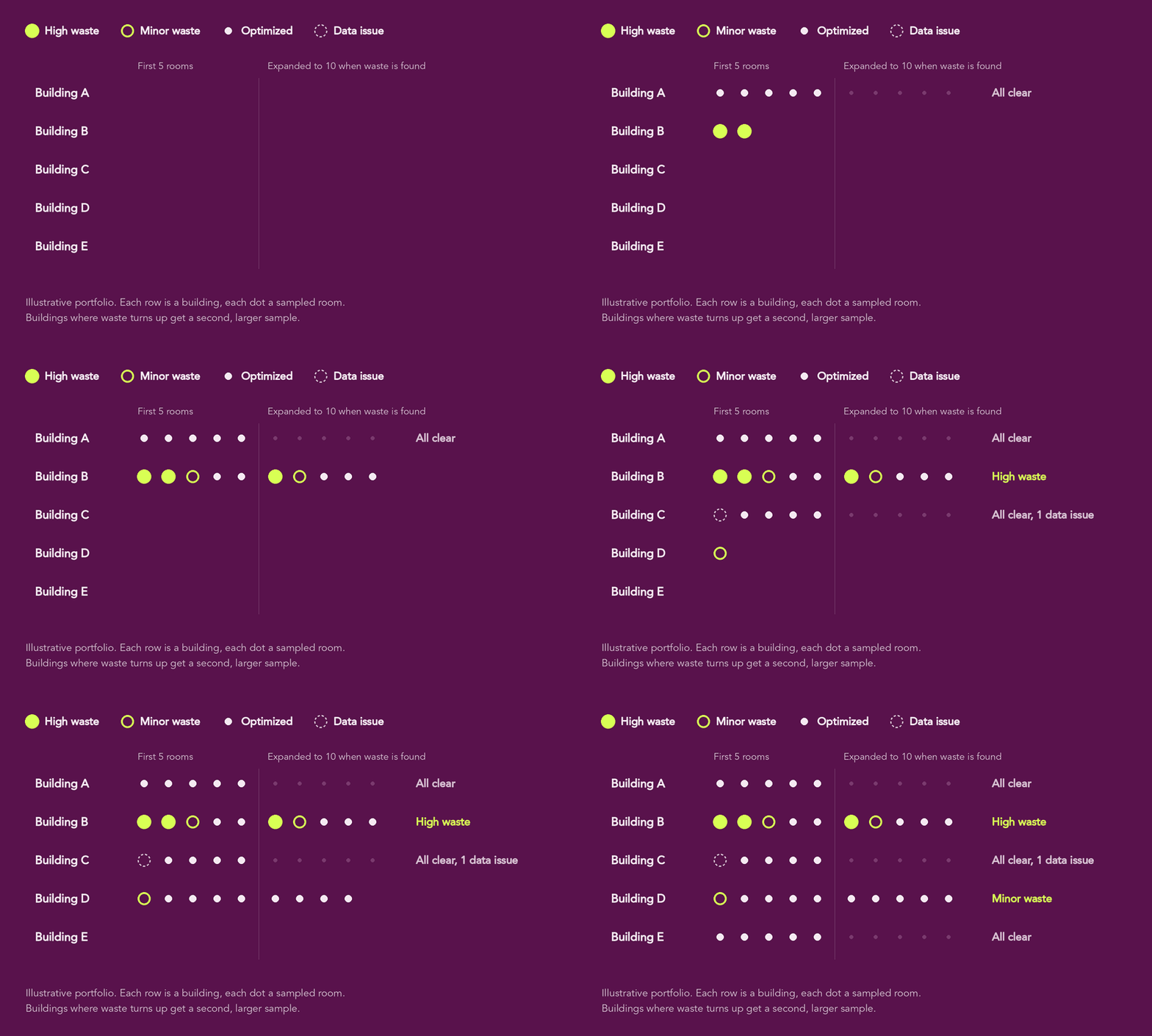
The short answer
To audit ventilation across a portfolio with AI agents, the agent checks one building per run. It samples rooms that have both airflow and presence sensors, compares airflow in empty hours with occupied hours, and uses weekend behavior to see whether the room can turn down at all. It classifies each room, samples more rooms where it finds waste, and routes a report for each building so the worst sites get fixed first.
Why ventilation waste hides in a portfolio
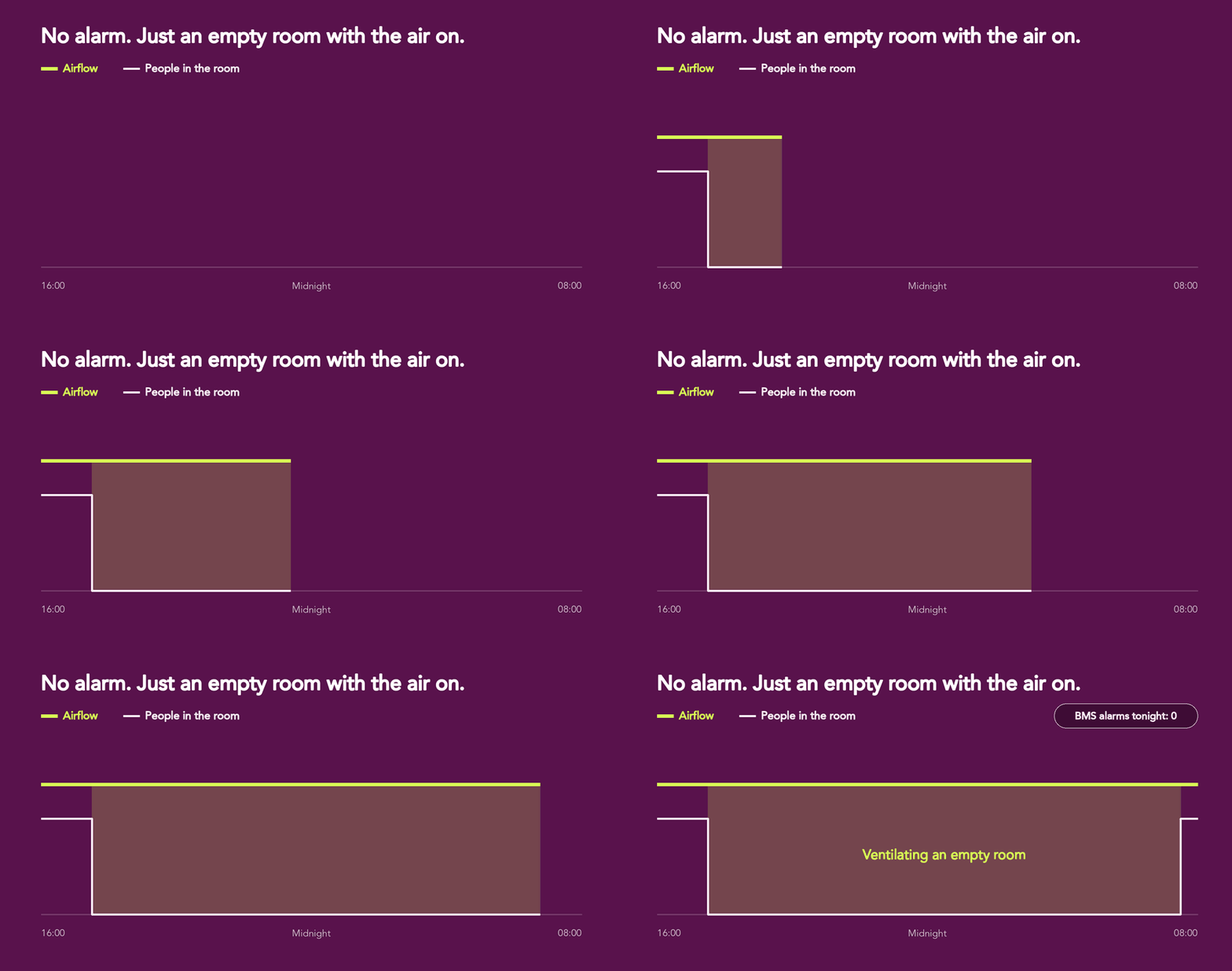
Ventilation waste rarely shows up as an alarm. A room is ventilated all night because a BMS override was never reset, a VAV damper is stuck open, a presence sensor was never linked to control, or a schedule set at commissioning no longer matches how the building is used. The system is doing what it was told, so nothing flags it.
In one building, an engineer can find this with a few days of trend logs. Across a portfolio of dozens of buildings and thousands of rooms, nobody has the time, so the waste stays until the next manual audit, often years later.
The cost is larger than the fan power. Every litre of outdoor air pulled into an empty room has to be heated in winter and cooled in summer, and that conditioning usually costs far more than moving the air.
How AI agents audit ventilation across a portfolio, step by step
In agentic building operations, agents read live building data, reason about it, and act inside guardrails a person sets. Here is how the ventilation audit runs in ProptechOS
1. Map which rooms can be audited
The agent looks across the portfolio for rooms that have both an airflow sensor and a presence sensor. In ProptechOS every building is mapped to the RealEstateCore ontology, so this is one query across all buildings instead of a point list per site. Rooms without both sensors are skipped and listed as a data gap.
2. Audit one building per run
The agent audits a different building on each scheduled run and works through the portfolio in rotation. Each run stays small and fast, and over a few weeks every building gets checked.
3. Sample rooms and expand when waste appears
It starts with five random rooms. If any of them show waste, it samples five more, so buildings with problems get a closer look and clean buildings don’t waste analysis time.
4. Split occupied and unoccupied hours
For each room it pulls 14 days of data (7 at minimum), converts timestamps to the building’s local time, and separates hours when people were present from hours when nobody was.
5. Use weekends as the control test
Weekend airflow shows whether a room can turn down at all. If airflow drops on weekends but not on weeknights, the problem is a schedule. If it never drops, suspect a stuck damper or a permanent override.
6. Classify and quantify each room
The agent only counts patterns that repeat on five or more nights, then classifies each room by the share of its ventilation that went to an empty room, and measures the waste in L/s-hours.
7. Report and route
Each run ends with one building report, handed to a routing agent that escalates the findings. Across runs, the reports build a portfolio view of which buildings to fix first.
How each room is classified
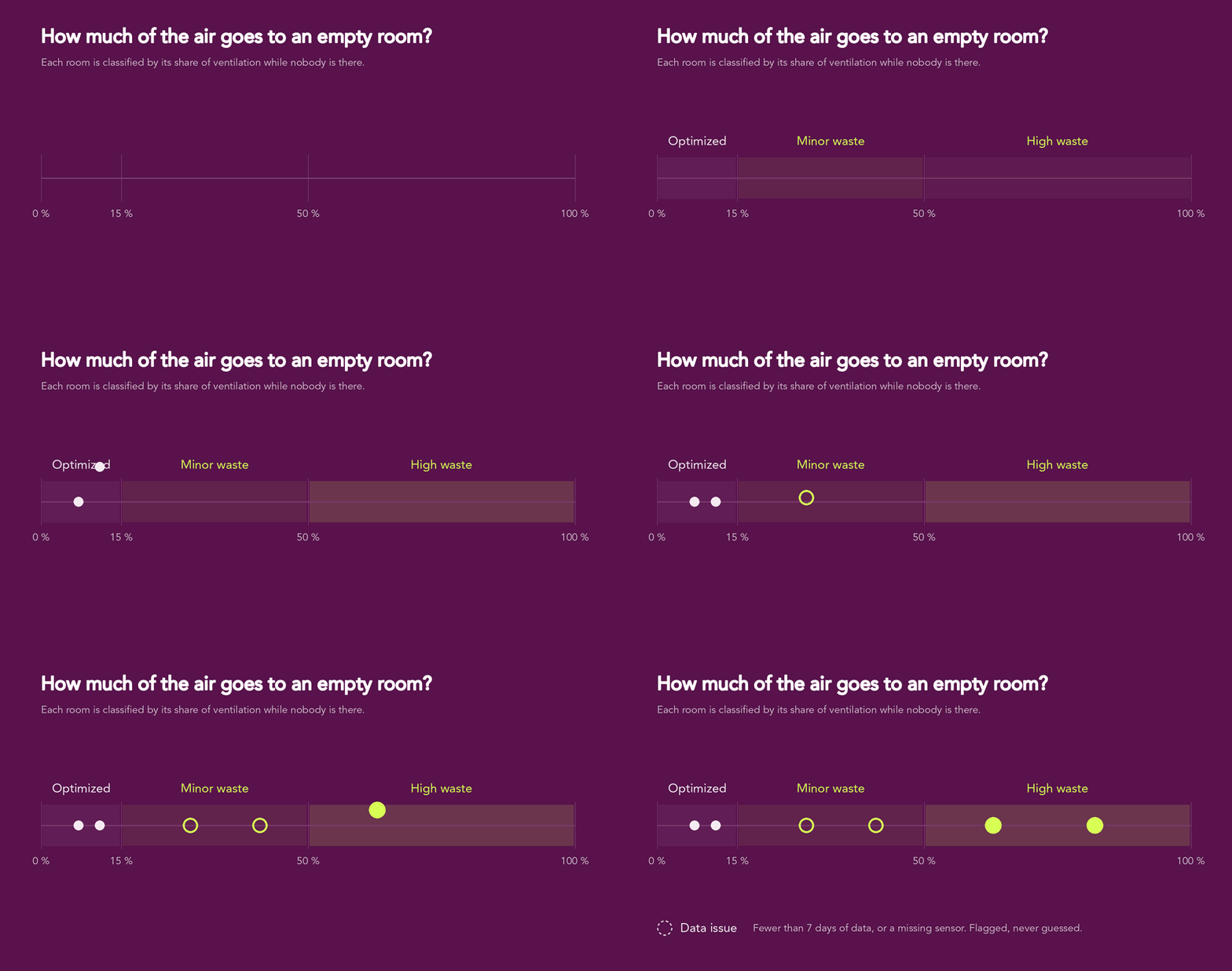
The agent classifies each room by the share of its total ventilation that went to the room while it was empty.
| Class | Share of ventilation to an empty room | Typical pattern |
|---|---|---|
| High waste | over 50 % | Full airflow day and night, no response to presence |
| Moderate or minor waste | 15–50 % | A steady baseline through empty nights, or turn-down on some nights only |
| Optimized | under 15 % | Little or no airflow beyond the required minimum, with a proper flush before people arrive |
| Data issue | n/a | Fewer than 7 days of data, or a missing sensor |
What the standards allow when rooms are empty
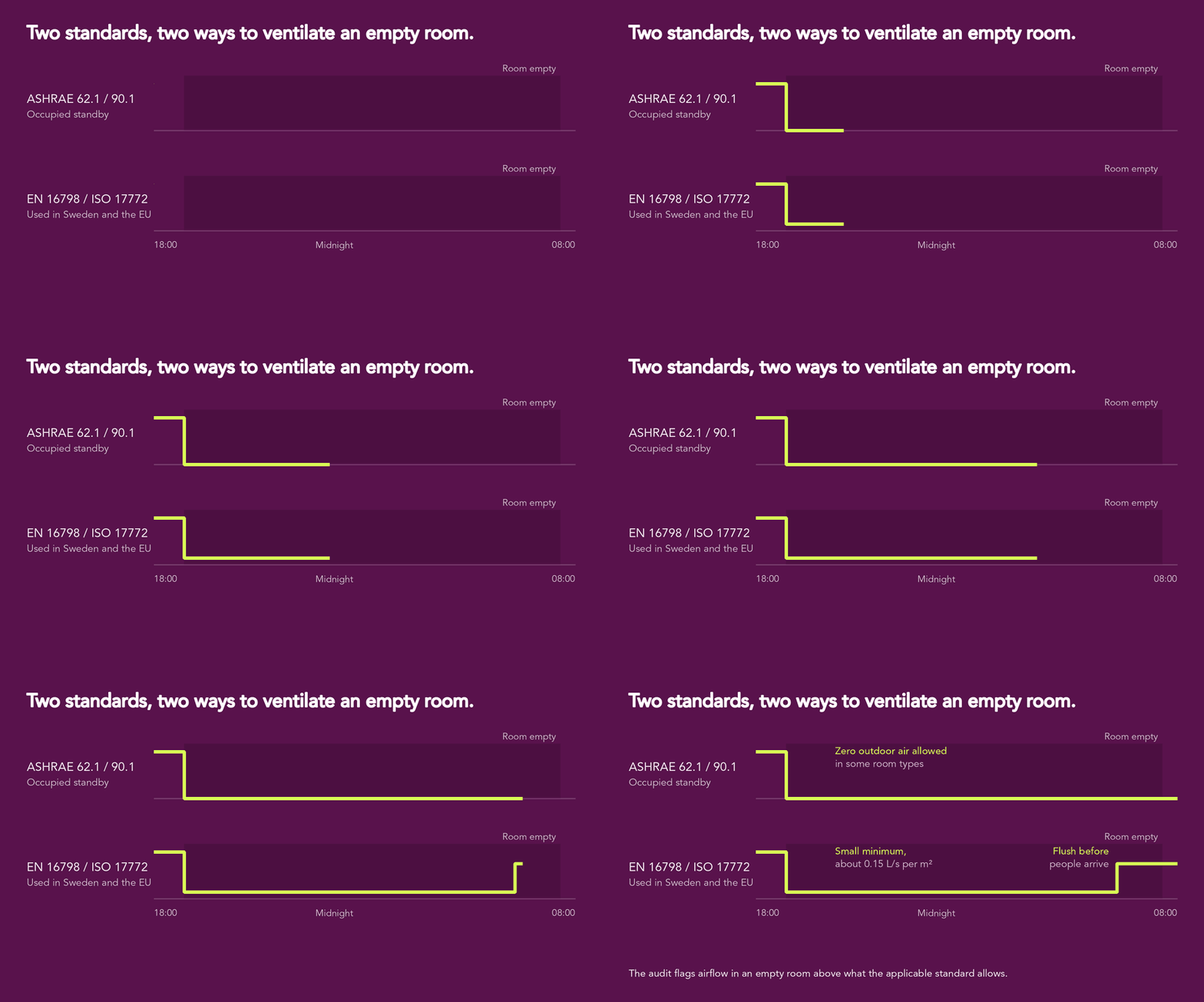
The right amount of night ventilation depends on the room type and on which standard applies, and the two main standards take different approaches.
- ASHRAE 62.1 and 90.1 require automatic shutoff or occupancy-based control, and allow zero outdoor air in certain room types when they are unoccupied (the “occupied standby” provision).
- EN 16798 and ISO 17772, used in Sweden and across the EU, recommend a small minimum of about 0.15 L/s per m² during unoccupied hours, and one full air change within the two hours before people arrive.
So the audit doesn’t treat every litre at night as waste. It flags airflow in empty rooms beyond what the applicable rule requires, and it checks that the morning flush happens.
What the agent does, and what it leaves to people
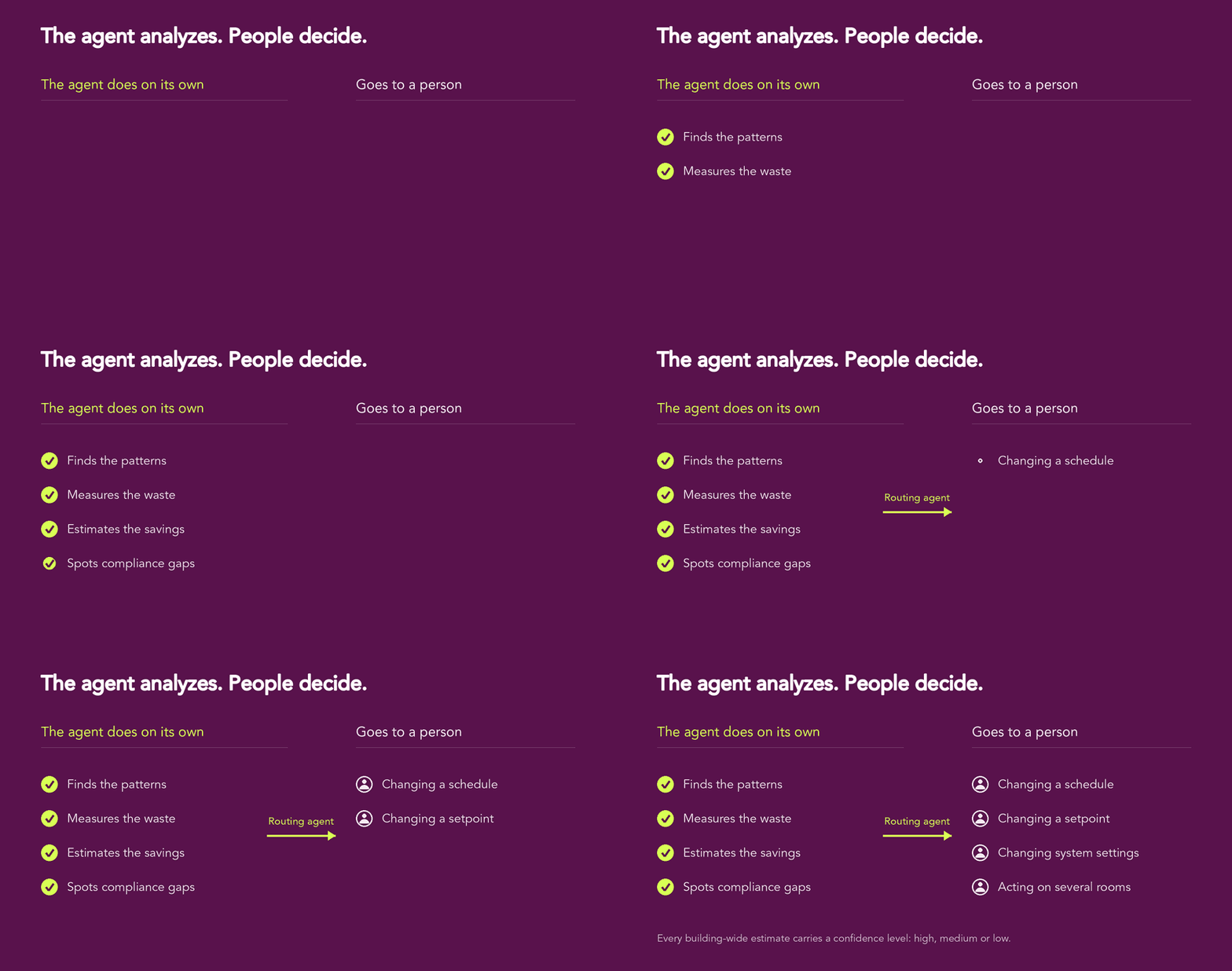
The audit agent works on its own for everything that is analysis: finding patterns, measuring waste, estimating savings and spotting compliance gaps. It never changes a schedule, a setpoint or a system setting, and never touches several rooms at once. Those decisions go to a routing agent and then to a person.
Every building-wide estimate carries a confidence level, high, medium or low, based on how many rooms were sampled and how consistent the patterns were.

How this fits into agentic building operations
A portfolio audit is only useful if the findings get fixed and stay fixed. In agentic building operations, several agents hand work to each other.
Finds the rooms and buildings that ventilate empty space, and measures how much.
Turns each finding into the right escalation: a schedule fix, a damper check or a work order.
Watches fixed rooms so overrides and drift don’t bring the waste back.
Frequently asked questions
How long does it take to audit a whole portfolio?
The agent audits one building per scheduled run, so the time depends on the number of buildings and how often it runs.
Why sample rooms instead of checking every room?
Sampling keeps each run fast and still finds the buildings with problems. When waste turns up, the agent doubles the sample for that building, and every building-wide estimate carries a confidence level.
What data does the agent need?
Airflow and presence data for the same room, with at least 7 days of history and ideally 14. Rooms missing either sensor are reported as data gaps rather than guessed.
Does the agent change ventilation settings?
No. It analyzes, quantifies and reports. Schedule changes, setpoint changes and anything affecting several rooms go through a routing agent and a person.
Should ventilation be zero when a room is empty?
It depends on the room type and the standard that applies. ASHRAE allows zero outdoor air in some unoccupied spaces, while EN 16798 recommends a small minimum. The audit checks each room against the rule that applies to it.
See what your heating curve is costing you
Connect a building to ProptechOS and the agents will build its heating signature, find the overheating, and show you the saving before anything changes.
Stop ventilating empty rooms
The agent checks your buildings on a schedule, compares airflow with presence data and puts a kWh and SEK figure on every room that runs when nobody is there.
Book a demo