
How to optimize heating curves automatically with agentic building operations
Most heating curves are set once at commissioning and never touched again. Here is how AI agents read the building’s own data, find the heat it doesn’t need, and lower the curve without cold complaints.
Loading the demo…
Put an energy auditor on your buildings
The agent splits consumption by end-use, benchmarks every system against ASHRAE 90.1 and ranks savings measures by payback, from the data your buildings already produce.
Book a demo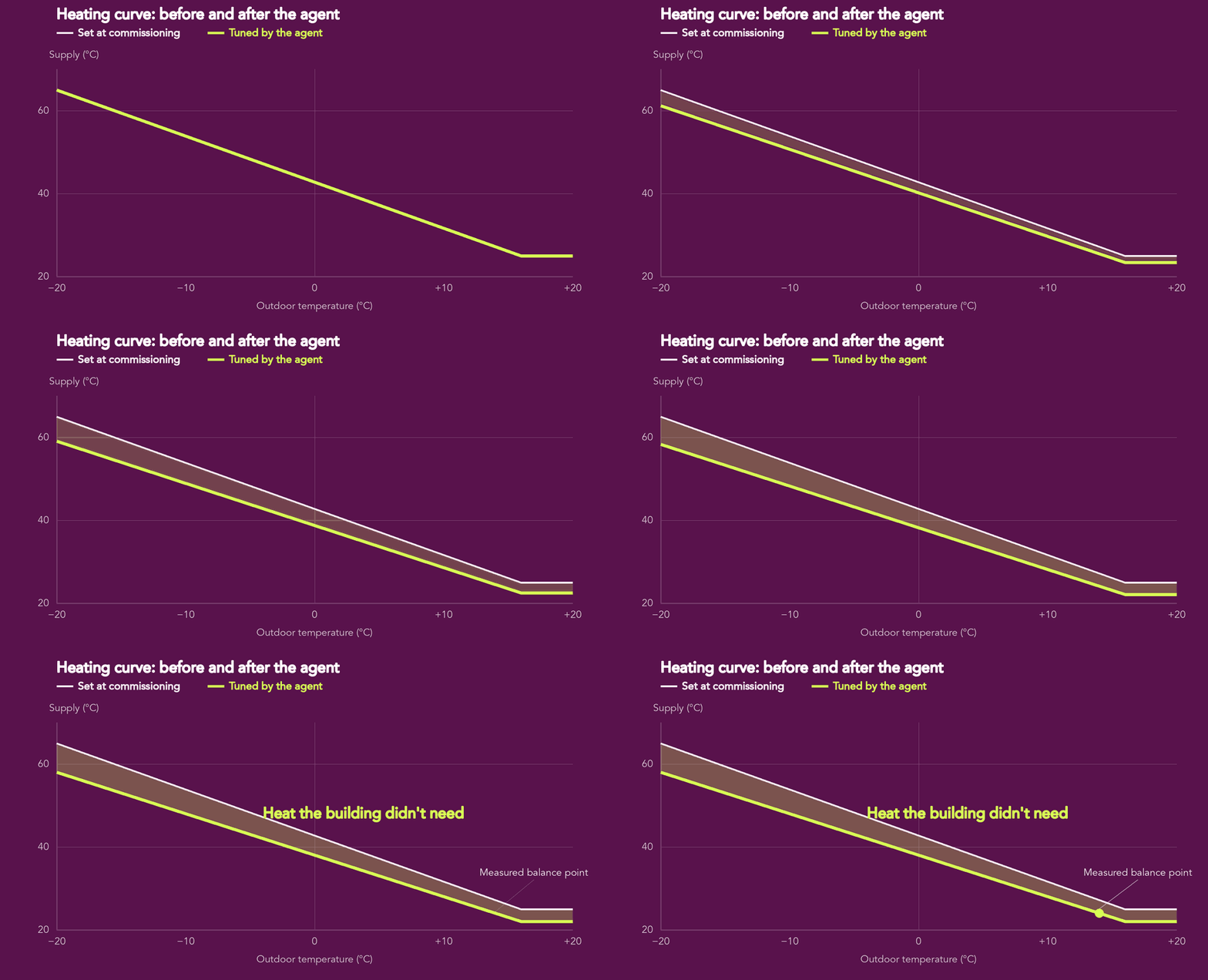
The short answer
To optimize a heating curve automatically, an AI agent builds the building’s heating signature, finds the coldest zones that limit how low the supply temperature can go, and proposes a lower curve with a comfort margin. After a person approves it, the agent applies the change in small steps, monitors zone temperatures, and verifies the savings against a weather-normalized baseline. If comfort drops, it rolls back.
What a heating curve does, and why it drifts
A heating curve, also called a weather compensation curve, tells the heating system which supply water temperature to deliver at each outdoor temperature. Colder weather means hotter water. Two settings define it: the slope (how steeply supply temperature rises as it gets colder) and the offset (a parallel shift of the whole curve up or down).
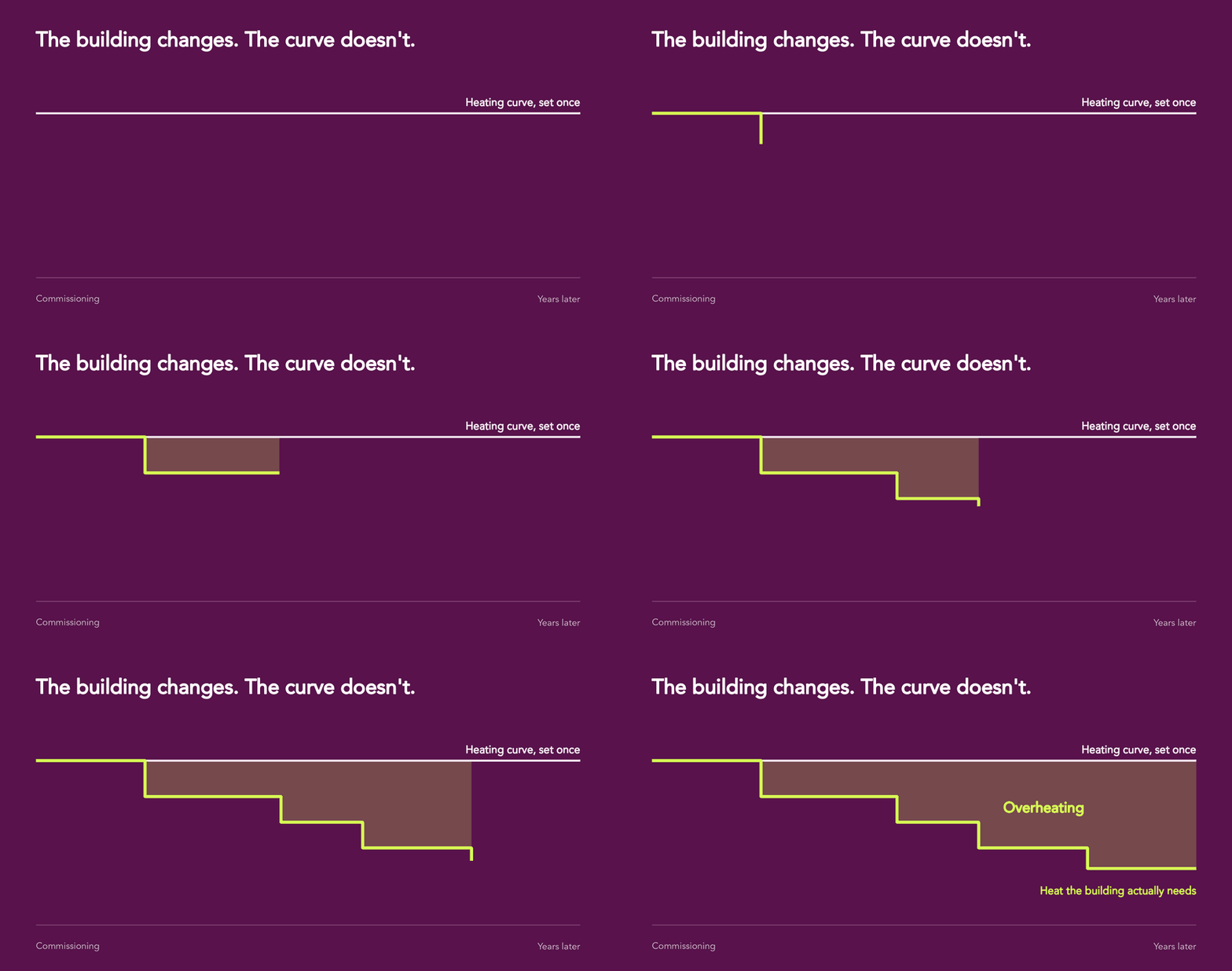
The curve is usually set at commissioning, often on the generous side so nobody complains in the first winter. Then the building changes. Windows are replaced, tenants move, floors are re-partitioned, ventilation schedules change, and the curve stays the same. The result is a building that is warmer than it needs to be for most of the heating season, with operators opening windows to cool rooms the heating system is actively warming.
Why a static curve wastes energy
Overheating costs more than the extra degree indoors. A supply temperature that is higher than necessary raises losses in several places at once:
- Space heating. A commonly cited rule of thumb is that each 1 °C of extra average indoor temperature adds roughly 5 % to heating energy.
- Heat pumps. Heat pump efficiency typically improves by around 2–3 % for each 1 °C reduction in supply temperature.
- Condensing boilers. They only condense, and reach their rated efficiency, when return water is cool enough, below roughly 55 °C for natural gas.
- District heating. Many district heating tariffs, including several in Sweden, reward low return temperatures or charge for high flow. An oversized curve pushes both in the wrong direction.
- Distribution. Hotter pipes lose more heat in shafts, plant rooms and ceiling voids.
None of this shows up as a fault. The BMS is doing exactly what it was told. That is why curve optimization is a job for an agent that keeps asking whether the instruction itself is still right.
How AI agents optimize the heating curve, step by step
How AI agents optimize the heating curve, step by step
In agentic building operations, agents read live building data and act inside guardrails a person sets. Here is how it works in ProptechOS.
- Connect the heating data
The agent reads temperatures, valve positions and the heat meter, mapped through RealEstateCore to the right circuit and room. - Build the heating signature
The agent finds the building’s balance point. Heating well above it means the curve is too high. - Find the critical zones
The coldest rooms set the limit. Rooms that are cold because of a fault get flagged instead. - Propose a curve adjustment
The agent proposes the smallest change that removes most of the overheating, with a comfort margin. - Approve and apply in stages
A person approves. The agent applies it 1 °C at a time, through the BMS or a work order. - Verify comfort and savings
The agent watches the coldest rooms and measures savings against a weather-normalized baseline. - Keep the curve tuned
The agent re-checks the curve over time and rolls back if a room gets too cold.
Guardrails the agent works inside
Letting software change heating setpoints is only useful if it is safe. The heating curve agent works inside hard limits that it cannot override:
- Human approval before any change to a live setpoint.
- Comfort floors per zone type, with automatic rollback if a critical zone breaches them.
- Minimum supply temperatures where the heating circuit also serves domestic hot water, so hygiene temperatures are always met.
- Frost protection for coils, exposed pipework and entrances.
- No action on bad data. If sensors are missing, frozen or implausible, the agent flags the gap for physical inspection instead of guessing.
Frequently asked questions
What is a heating curve?
A heating curve sets the supply water temperature of a heating system based on the outdoor temperature. Colder weather gives a higher supply temperature. Its slope and offset decide how much heat the building receives in each kind of weather.
How much energy can heating curve optimization save?
It depends on how much the building overheats today. A commonly cited rule of thumb is that each 1 °C reduction in average indoor temperature cuts heating energy by roughly 5 %. Lower supply temperatures also raise heat pump efficiency and help condensing boilers and district heating return temperatures.
Is it safe to let an AI agent change heating setpoints?
Yes, when it works inside guardrails: a person approves the change, the agent adjusts in small steps, hard limits protect domestic hot water and frost protection, and it rolls back automatically if any critical zone drops below the comfort limit.
What data does heating curve optimization need?
At minimum: outdoor temperature, supply and return temperatures, and zone temperatures from a representative set of rooms. Heat meter data and valve positions make the analysis and the savings verification far more reliable.
How is this different from a BMS heating curve?
The BMS runs the curve it was given, often the one set at commissioning. An agent keeps checking whether that curve still matches the building, proposes changes from measured data, and verifies the result.
See what your heating curve is costing you
Connect a building to ProptechOS and the agents will build its heating signature, find the overheating, and show you the saving before anything changes.
